
Template
Free Hazard Report Template for Construction Sites
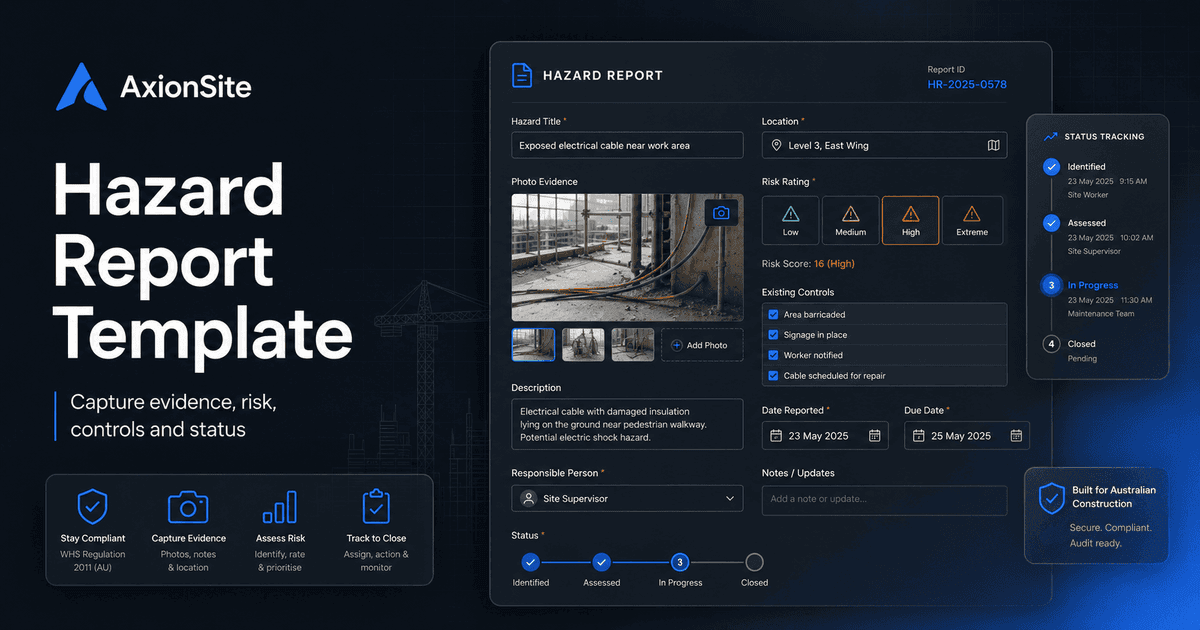
Structure for capturing hazards on site: description, location, evidence, risk, controls, ownership and status — aligned to good WHS record-keeping practice.
Download a printable copy
PDF for toolbox or site records, Word for adapting fields to your IMS or client requirements.
Complete the security check to enable downloads.
A hazard report should make it easy for anyone on site to flag risk early, assign ownership and close the loop. This outline suits paper, spreadsheet or system capture — the important part is consistency and follow-through.
Who this helps
Workers, supervisors, WHS reps and project managers managing open hazards across one or many sites.
What this template is for
A good hazard report gives supervisors enough context to decide priority, ownership and controls without delaying reporting. It should capture what was observed, where it was observed, what evidence exists, and what action was taken or assigned.
How to use it
Encourage early reporting, even where the control is not obvious yet. Attach photos where safe, use a simple risk rating consistently, and close the loop with the person who reported the hazard so the system builds trust rather than becoming a black box.
This checklist follows the risk-management flow: identify the hazard, make it safe, assess the initial and residual risk, assign controls using the hierarchy of control, then verify the fix and close the feedback loop.
1. Hazard observation details
- Date/time reported, reporter name/contact and site/project are recorded.
- Exact location is clear: area, level, grid, room, work zone or GPS/photo marker.
- Hazard is described in plain language: what is unsafe and what could go wrong.
- Work activity underway or affected by the hazard is recorded.
- People exposed are identified: workers, subcontractors, visitors, public, tenants or nearby trades.
- Photos or sketches are attached where safe and do not create further risk.
2. Immediate action and make-safe controls
- Immediate make-safe action taken or required is recorded.
- Area is isolated, barricaded, tagged out or access restricted if the hazard is uncontrolled.
- Supervisor, HSR, principal contractor or relevant PCBU has been notified where required.
- Stop-work decision is recorded if work cannot continue safely.
- Temporary controls are clearly marked as temporary and assigned for follow-up.
3. Risk assessment and priority
- Potential consequence is identified: injury, illness, fire, plant strike, fall, exposure, property damage or environmental harm.
- Likelihood is assessed using the organisation's risk matrix or agreed scale.
- Initial risk rating is recorded before additional controls.
- Residual risk rating is recorded after proposed controls.
- High/critical risks are escalated according to site procedure before close-out.
- Related SWMS, inspection, permit, incident or contractor record is linked if relevant.
4. Corrective controls using hierarchy of control
- Elimination has been considered before lower-order controls.
- Substitution, isolation or engineering controls are considered where elimination is not reasonably practicable.
- Administrative controls are specific: exclusion zone, procedure change, supervision, permit, scheduling or signage.
- PPE is listed only as a supporting control, not the only control for a serious hazard.
- Control owner, due date and verification method are recorded.
- Worker consultation/feedback is recorded where the control changes how work is done.
5. Review, verification and close-out
- Corrective action is verified by a competent person or nominated supervisor.
- Evidence of close-out is attached: photo, inspection result, permit update, training record or revised SWMS.
- Reporter or affected workers are told what action was taken where appropriate.
- Trend/theme is reviewed if similar hazards keep recurring.
- Status and audit history show new, assigned, in progress, verified, closed or reopened.
- Hazard remains open if controls are incomplete, ineffective or not yet verified.
Best-practice notes
Close feedback loops publicly where safe to do so: people stop reporting if nothing happens. Pair hazard reporting with inspection programmes so themes surface before incidents.
Related: Site inspection checklist.