
Why WHS Compliance Needs a Connected Dashboard, Not Another Folder of PDFs
How Australian WHS teams can use connected SWMS, sign-ons, incidents, inspections and hazard registers for stronger compliance oversight.
Most WHS teams do not fail because they lack forms. They struggle because the evidence is spread across too many places: a SWMS in one folder, a sign-on sheet on paper, an incident record in email, an inspection checklist in another app and a hazard photo buried in a phone gallery.
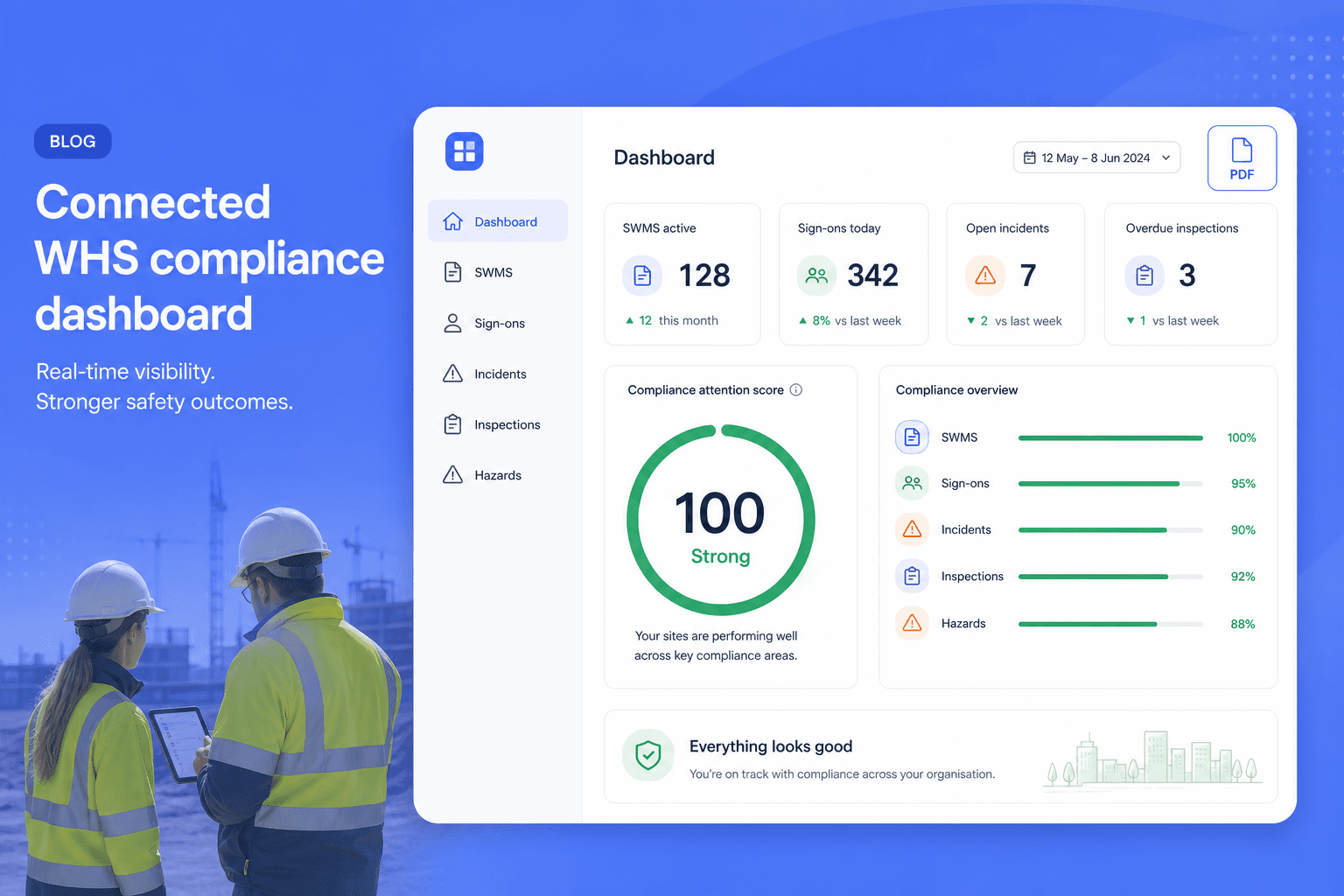
That is why AxionSite's compliance and auditing functionality is built around a connected compliance dashboard first. PDF reports are valuable, but they are the output. The real strength is organisation-wide monitoring: SWMS, QR sign-ons, incidents, inspections and hazard/photo reports feeding one operational view.
The Australian WHS compliance problem is evidence fragmentation
Under the model WHS laws, a person conducting a business or undertaking (PCBU) must manage risks to health and safety so far as is reasonably practicable. Safe Work Australia also makes clear that PCBUs must consult with affected workers and consult, cooperate and coordinate with other relevant duty holders.
For construction and field work, this quickly becomes a record problem as much as a form problem. Leaders need to know:
If those answers sit in separate systems, compliance work becomes manual reconciliation. Safety managers and supervisors lose time chasing screenshots, spreadsheets and inbox trails instead of improving controls on site.
AxionSite's answer is to connect the registers. Each record still has its own detail, evidence and audit trail, but the compliance dashboard gives an organisation-wide operating picture.
What Australian guidance says about monitoring, review and records
Safe Work Australia describes risk management as identifying hazards, assessing risks, controlling risks and reviewing controls. For high-risk construction work, PCBUs must prepare, keep, comply with and review a Safe Work Method Statement before work starts. A SWMS sets out the high-risk work activities, hazards and how risks will be controlled.
That means the important compliance question is not only "Do we have a SWMS?" It is:
The same pattern applies across incidents, inspections and hazards. A strong WHS system needs evidence that the organisation is monitoring work, responding to risks and maintaining reviewable records.
ISO 45001 and ISO 45004 make the same point in management-system language
ISO 45001 is the international occupational health and safety management system standard. Its performance-evaluation logic is about monitoring, measurement, analysis, evaluation and audit.
Standards Australia's AS/NZS ISO 45004:2024 guidance goes further into performance evaluation. It encourages a balanced approach that combines leading and lagging indicators, including inspections, audits, qualitative and quantitative indicators. The goal is to help organisations identify weaknesses before incidents or injuries occur.
That maps directly to how modern WHS software should work. A compliance dashboard should not be only a lagging indicator scoreboard. It should pull together:
AxionSite's compliance dashboard is designed around this idea: a live operational signal, not a static folder.
What AxionSite connects into the compliance dashboard
AxionSite connects the operational records that usually sit apart.
SWMS register
The SWMS register tracks draft, awaiting approval, active signed, needs re-approval and archived records. Revisions preserve the prior SWMS for audit. Review history, PDF exports and row-level audit trails stay tied to the record.
For high-risk construction work, this matters because a SWMS is not a one-time template. It must be prepared, kept, complied with and reviewed. AxionSite gives teams a clearer way to see whether the document is current and whether the record has drifted since sign-off.
QR worker sign-ons
Worker sign-on is separate from SWMS approval, and it is also separate from site induction. AxionSite treats it that way. A worker scanning a QR or opening a sign-on link can read the pack and sign on without needing a dashboard account, and without completing an Axion induction unless the organisation turns that policy on. Expected sign-ons can be tracked against completed sign-ons, which helps supervisors see gaps before work starts.
This supports consultation and communication in practice. It does not prove legal compliance by itself, but it creates a stronger, timestamped record than a loose paper sheet.
Contractor submissions
Contractors can submit SWMS information through external submission links on higher plans. The host organisation can then review the submission internally, retaining contractor/employer context and "provided by" details.
For councils, principal contractors and multi-site organisations, this reduces inbox archaeology. Contractor evidence becomes a register item, not a buried attachment.
Incident reporting
Incident records capture severity, status, possible notifiable flags, evidence, actions, links to related SWMS or inspections and notification audit events where used. Conservative wording matters: the system can surface "possible notifiable incident" prompts, but the organisation still reviews and decides its regulator obligations.
For WHS leaders, the dashboard value is seeing which incident records remain open, assigned or overdue, not merely producing a PDF after the fact.
Inspections
Inspection records provide checklist-based evidence, pass/fail/N-A outcomes, photos and corrective actions. Critical failures remain visible. This is a classic leading indicator: inspections can reveal weaknesses before they become incidents.
Connected inspection data gives managers a better view of control effectiveness than a folder of completed checklists.
Hazard/photo reports
AxionSite's photo hazard reporting beta can help structure hazards and actions from uploaded site photos, with human review before saving. These records then contribute to the broader view of open hazards and evidence captured from site.
The power is not just AI detection. The power is connecting that hazard evidence into the same operating system as SWMS, incidents and inspections.
The compliance attention score: what "100 Strong" means
The compliance attention score is a directional management signal. A score like 100 Strong means the current snapshot has few or no weighted attention items across connected registers.
It is intentionally not described as "certified", "legally compliant" or "regulator approved". No software can guarantee those outcomes. A competent person and the PCBU must still make the real-world WHS decisions.
But a strong score is useful because it helps answer an executive question quickly: "Where should we look first?"
When the score drops, leaders can investigate the source: overdue reviews, unsigned workers, open incident actions, failed inspections or unresolved hazard records. When the score is strong, the organisation has a clearer evidence-backed reason to believe its records are under control for that snapshot.
Who this makes easier for
Safety managers
Safety managers are often asked to prove the system is working while also supporting real work on site. AxionSite reduces the time spent reconciling registers by keeping SWMS, sign-ons, incidents, hazards and inspections in one place. Teams tracking mobile plant can use the AxionSite plant & equipment register (https://axionsite.com/features/plant-equipment-register) to connect QR pre-starts, defects and service records with the same dashboard.
Instead of manually building a weekly compliance pack, they can review the dashboard, investigate attention items and export a PDF report when needed.
Supervisors and leading hands
Supervisors need simple answers: what is current, who has signed on, what needs action and what can be shown if someone asks. Mobile-friendly registers, QR sign-ons and row actions reduce the friction of keeping evidence current.
Project managers and operations leaders
Project managers need cross-site visibility without becoming WHS administrators. A connected dashboard lets them see which work fronts have missing reviews, open incidents or unresolved actions before those gaps become delays.
Executives, council GMs and governance teams
Executives need confidence without reading every SWMS. The compliance dashboard gives a management-level view, while the PDF report creates a management-review or audit-pack artefact when a snapshot needs to be shared.
Auditors and reviewers
Auditors do not just want a pretty PDF. They want evidence: timestamps, review history, worker acknowledgements, incident actions, inspection outcomes and exportable records. AxionSite keeps those records tied to the source registers, then makes retrieval easier with structured compliance exports (https://axionsite.com/features/compliance-exports).
Why a dashboard beats a PDF-first compliance process
PDF reports are important. They are easy to share, archive and attach to management packs. But a PDF-first process can become stale the moment a new incident, inspection or SWMS revision happens.
A dashboard-first process is stronger because it monitors the live records. PDF reports become a snapshot of the current position, not the source of truth.
That distinction matters for Australian WHS governance. Compliance work is ongoing. Controls need review. Workers need consultation. Incidents and hazards need action. Inspections need follow-up. A static export cannot manage that flow by itself.
How AxionSite positions this against traditional systems
Traditional WHS software often separates modules: one area for inspections, another for incidents, another for contractor documents and another for reporting. Generic document systems go further in the wrong direction by making every record a file to find.
AxionSite's compliance and auditing strength is the connection:
| Compliance need | Folder or spreadsheet approach | AxionSite connected approach |
|---|---|---|
| SWMS status | Manual file naming or spreadsheet tracking | Register status, review history, revisions and exports |
| Worker sign-on | Paper sheets or scanned PDFs | QR/link sign-ons with timestamps and expected-vs-completed tracking |
| Contractor submissions | Email attachments | External submission links feeding pending review records |
| Incidents | Separate forms and follow-up emails | Incident register, actions, evidence and audit events |
| Inspections | Checklist PDFs | Inspection records with outcomes, photos and critical-fail visibility |
| Management reporting | Manual weekly collation | Automated compliance dashboard with PDF report export |
Swipe to see all columns →
The conservative compliance promise
AxionSite does not certify legal compliance. It does not replace a competent safety professional, a PCBU's duty, legal advice or regulator guidance.
What it does is make compliance work easier to manage:
That is the practical strength: not just better-looking reports, but stronger organisational visibility.
Sources and further reading
Ready to automate your WHS compliance?
Watch the short walkthrough on our AxionSite product page—the same flow from site details through SWMS generation, sign-off, PDF export, and crew sign-on—then start your trial when you’re ready.